
 Blu Super Agent
Let's be honest: Most SaaS onboarding journeys are just a polite way of ghosting your own customers.
You spend a fortune on acquisition, only to send your new users a generic "Day 3" email they'll never open while they're busy forgetting your password.
If you want to stop the bleed, you have to stop treating onboarding like a lecture and start treating it like a conversation.
By using a behavior-driven journey builder, you can trigger the right help at the exact moment a user gets stuck.
This guide is your blueprint for building a SaaS onboarding journey that doesn't just "welcome" people, but actually drives them to the "Aha!" moment using Intempt.
What is a SaaS onboarding journey?
A SaaS onboarding journey is the set of automated messages, in-product experiences, and behavioral triggers that move a new user from signup to their first moment of value — and from first value to product habit.
It works by responding to what users do (or don't) in your product, rather than sending messages on a fixed schedule.
The goal is not to introduce every feature. The goal is to get users to a specific activation milestone before they lose momentum and stop returning.
- Onboarding journey responds to user behavior in real time
- Calendar sequence sends emails based on elapsed time since signup, regardless of behavior
- Activation milestone is the specific action or set of actions that correlates with 30-day retention in your product
- Exit logic removes users from the journey the moment they activate, so activated users never receive irrelevant onboarding messages
Why Most SaaS Onboarding Journeys Fail
It's rarely a "bad copy" problem — it's a situational awareness problem. If your activation rate is under 25%, you likely have one of these three structural leaks:
- The "No-Exit" Trap: A user masters your product on Day 1, but still receives the "Getting Started" email on Day 3 and a "Tips" email on Day 5. Every irrelevant message trains your customer to ignore you.
- The "One-Size-Fits-All" Sequence: A solo founder and a Corporate VP have vastly different needs. Sending them the same sequence isn't just lazy — without behavioral branching, you're talking to everyone and reaching no one.
- The "Stranger Treatment" for Returners: When a churned user finally comes back to your site, their intent is through the roof. If your site greets them with a generic "Start Free Trial" button, you've missed your highest-leverage return signal.
Fix your event tracking and segment definitions before you hire a copywriter to "optimize" your emails. Data is the foundation; copy is just the paint.
How a Behavioral Onboarding Journey Works
A modern journey doesn't run on a calendar — it runs on a "Live Loop" of three components:
1. Live Segments (The Brain)
Instead of static lists, use segments that update in real-time. When the journey asks "Has this user activated?", it's checking their current status, not a database field from last Tuesday.
2. Behavioral Triggers (The Engine)
Actions dictate the next step. Not days.
- User stalls? Send a nudge.
- User replies to an invite? Unenroll them and move to a 1-on-1 chat.
- User hits a milestone? Celebrate and move to the next level.
3. Exit Conditions (The Guardrail)
The moment a user reaches the "Aha!" moment, the onboarding stops. This prevents over-messaging and ensures your brand remains a helpful guide, not a nuisance.
The Full Loop: From Sign-Up to Power User
- Entry: User signs up and triggers the journey.
- The Immediate Win: A welcome message fires within 10 minutes to capitalize on momentum.
- The "Check-In": Every subsequent step begins with a condition: Has the user activated?
- The Early Exit: If the user is winning, they exit. We stop talking so they can keep working.
- The Safety Net: Users who haven't activated by Day 7 are flagged — triggering a Slack alert so Customer Success can jump in.
- The Graduation: Activated users are automatically moved to a "Feature Adoption" journey to turn them into power users.
How to build a SaaS onboarding journey?
Step 1: Track the right events
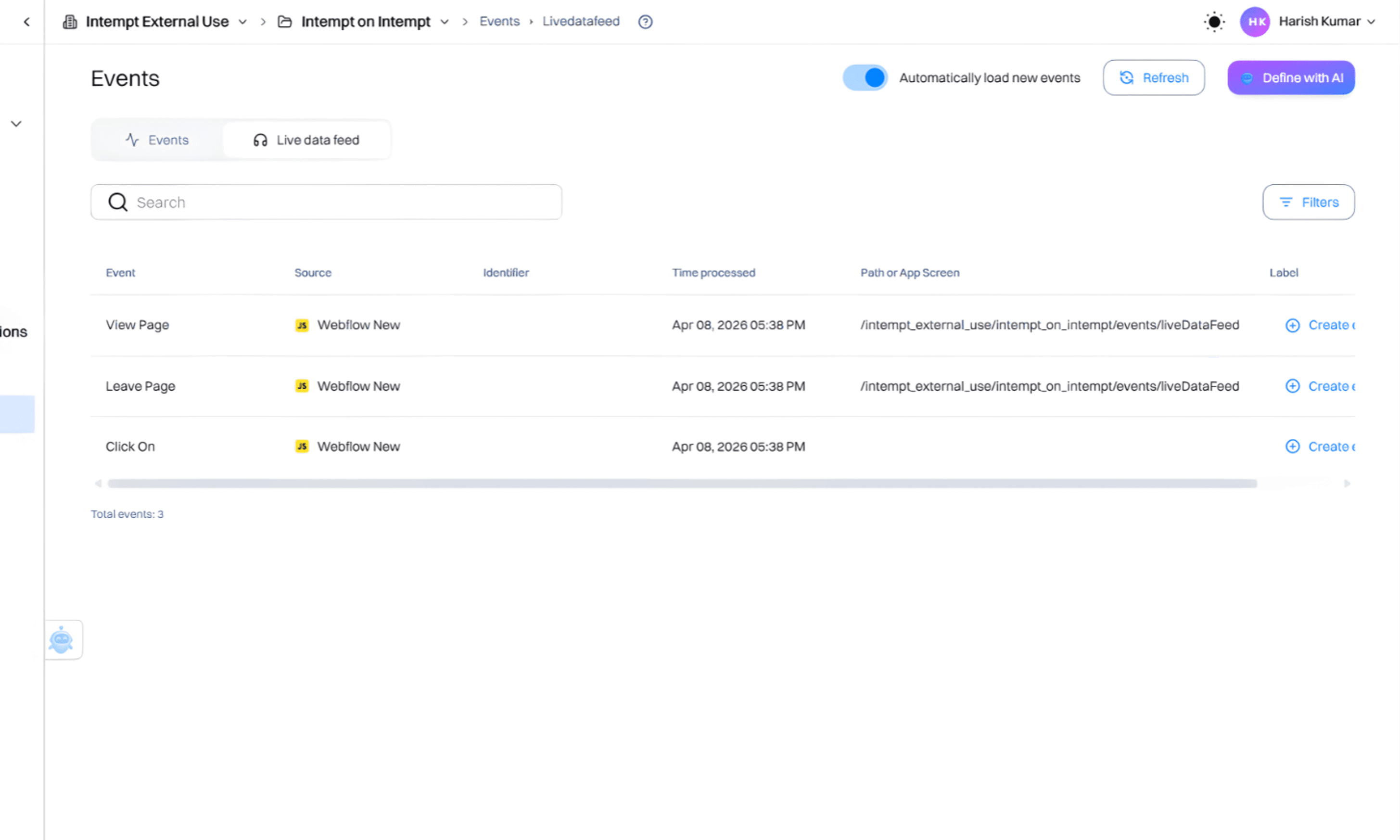
A journey cannot respond to what it doesn't see. Most onboarding fails because it's based on time (Day 1, Day 2), rather than action. You need clean event tracking to trigger the right messages.
Install the Intempt JavaScript SDK in the head section of your root files. The "Big 5" events to track:
- user_signed_up — the entry trigger
- login — measures retention frequency
- feature_used — track every core feature (e.g., created_report or invited_teammate)
- profile_completed — signals the user is "set up"
- plan_upgraded — the ultimate success metric
Once live, use the Data Analyst Agent view to watch events fire in real-time. If you don't see these events firing, your journey is flying blind.
Step 2: Define your segments
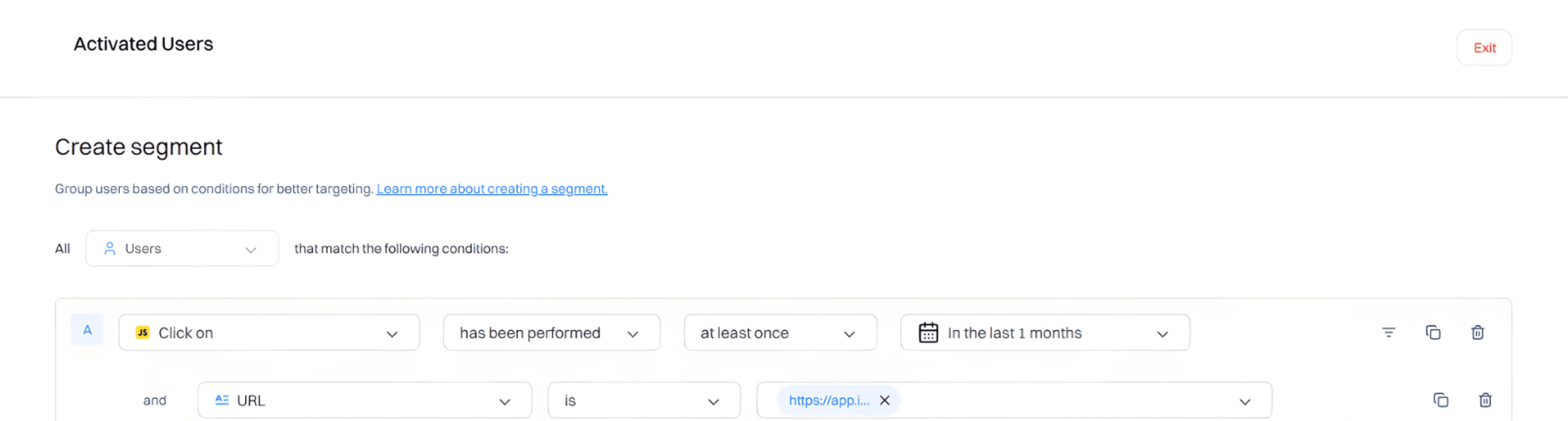
Segments are the "brain" of your journey. They tell the system who is winning and who is stuck. Instead of manual exports, use dynamic segments that update every second.
Open the Blu AI Assistant and prompt it to create these four specific buckets:
- Activated Users — users who have used 3+ core features OR completed their profile and invited a teammate
- Signed Up, Not Activated — those who signed up but haven't hit the activation bar yet
- Churned Users — previously active users who haven't logged in for 30+ days
- Returning Churned Users — members of the "Churned" segment who just fired a login event
Creating a "Returning Churned Users" segment is a game-changer. These users have high intent but are often treated like strangers. Recognizing them is the easiest way to lower churn.
Step 3: Win-back personalization for churned users who return
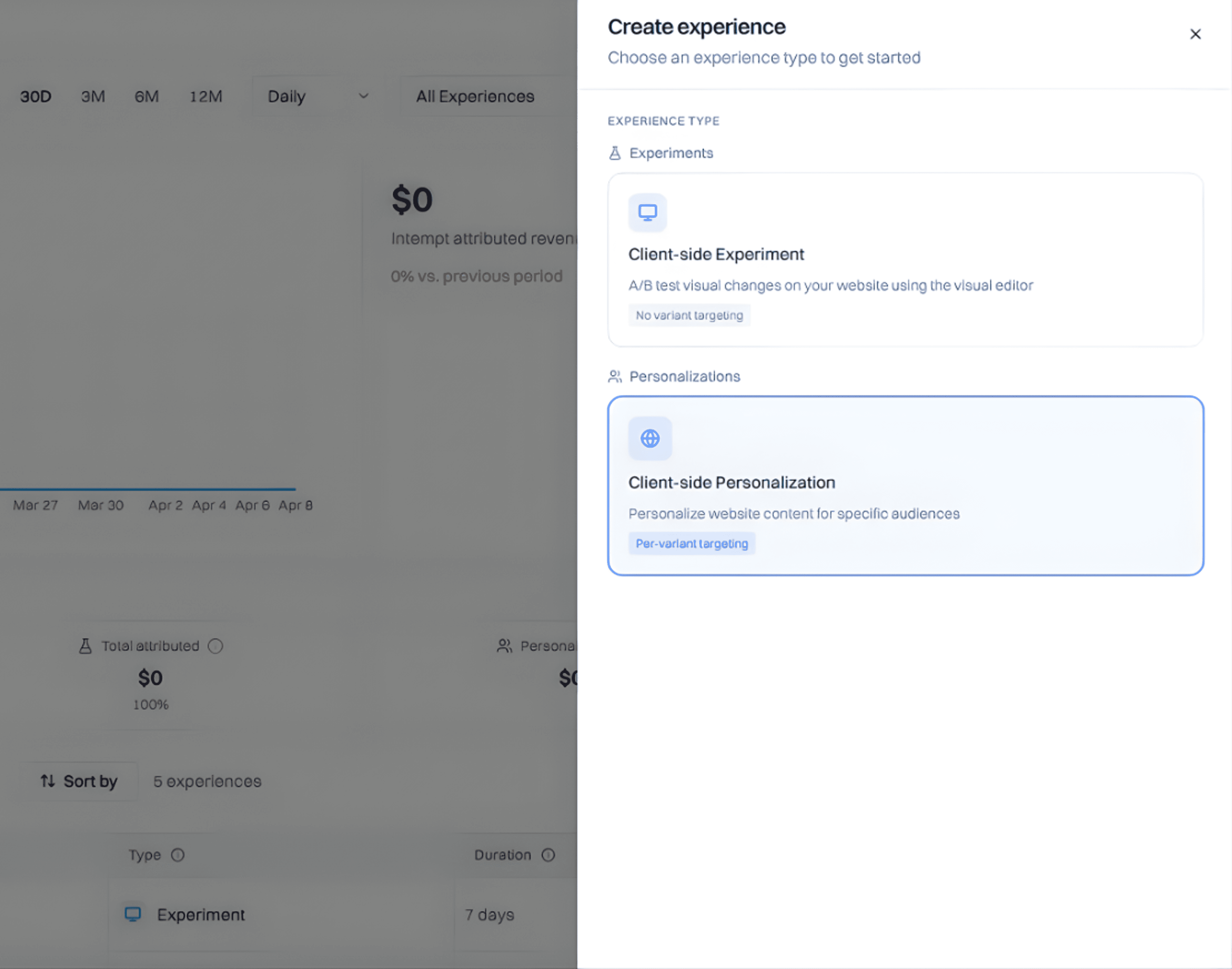
Treating a returning churned user like a brand-new lead is a friction-filled experience. You need to acknowledge their history with your brand.
Go to Experiences and launch a Web Personalization campaign with these settings:
- Audience: Set to "Returning Churned Users"
- Hero Headline: Change "Start Your Free Trial" to "Welcome back. A lot has changed since you left — see what's new."
- CTA: Change "Sign Up" to "Log Back In" or "View Dashboard"
You're removing the "mental debt" of starting over. By making the product feel familiar, you bridge the gap back to active usage instantly.
Step 4: Build the onboarding journey
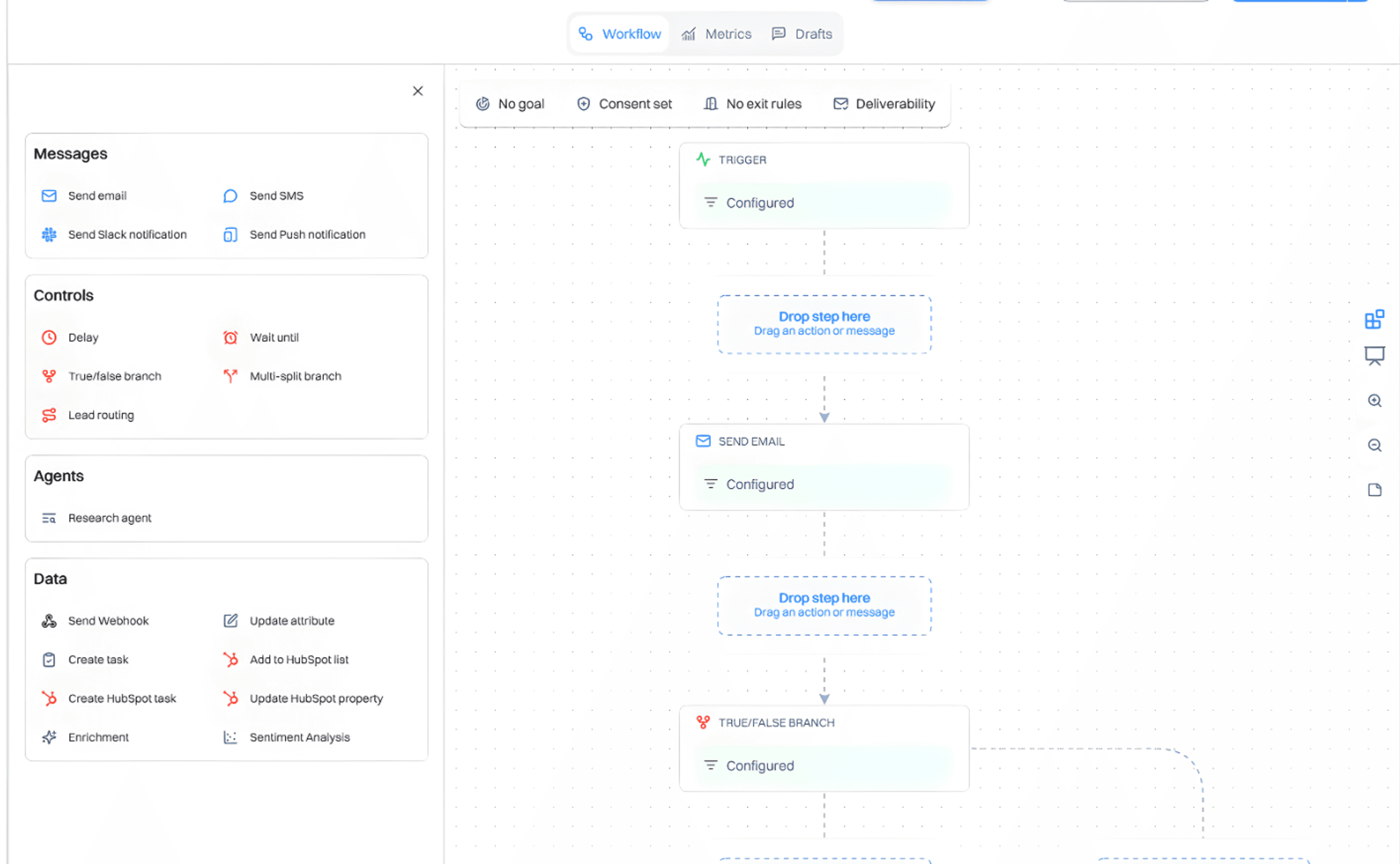
The goal isn't to send seven emails — it's to get the user to activate. If they activate on Day 1, they should never see the Day 2 "How-to" email.
Use the Journey Builder to map this logic:
- The Trigger: user_signed_up
- The 10-Minute Mark: Send a "Welcome" email via SendGrid
- The Day 2 Condition: Check: Is the user in the "Activated" segment? If Yes → Exit Journey. If No → send a nudge.
- The Day 3 "Personal" Branch: Use a lead score. High-fit users get a personal Gmail from the founder (automated but looks 1-on-1). Low-fit users get a standard feature tip.
- The Day 7 "Final Guardrail": If still not activated, tag them with onboarding_status: failed_7d and alert your team.
A personal email from a "real" name (the founder) achieves 3x the response rate of a marketing blast. It makes the user feel like a partner, not a lead.
Step 5: Post-activation feature adoption
Activation is just the beginning. Users who adopt three or more features churn at roughly half the rate of those who use only one.
Trigger a secondary Feature Adoption Journey the moment someone enters the "Activated" segment.
- At Day 21, check total features used
- If fewer than 3 features, fire a Slack Notification to your Customer Success channel
- Include their name, signup date, and exactly what they haven't tried yet
Automation handles the 90%, but the Slack alert ensures that your high-value users get a human "lifeline" before their first 30 days are up. Give your customer success team enough context to send a useful first message — not just a name.
What metrics matter for a SaaS onboarding journey?
After 14 to 30 days, review these in Intempt Reports:
- Activation rate — percentage of signups who join the Activated Users segment within 14 days. Below 25% means a structural problem. Above 60% means the journey is working and focus should shift to adoption depth.
- Time to activation — average days between signup and joining Activated Users. Above seven days means friction exists somewhere in Steps 1 through 3. Investigate stall points, not email performance.
- Exit reason split — how many users exited by activating versus by completing all seven days without activating? High timeout rate with low activation means the product is not clicking. That is a product problem, not an email problem.
- Feature adoption by cohort — which features do activated users adopt first, and which do they skip? Feeds the adoption journey sequence in Step 5.
- Returning churned user re-engagement rate — percentage of the Returning Churned Users segment who log in after seeing the personalized homepage. Compare against a 5% control group to measure actual lift.
What is a good activation rate for SaaS onboarding?
Activation rate benchmarks vary by product complexity, but these ranges apply to most PLG and sales-assisted PLG products:
| Activation rate | What it signals | What to do |
|---|---|---|
| Below 20% | Structural problem: event tracking, product friction, or wrong ICP | Audit events and segment definition before touching emails |
| 20 to 40% | Room to improve with behavioral logic and better branching | Build the journey in this guide |
| 40 to 60% | Healthy. Optimize timing and the high-fit branch | Test the Gmail personal outreach on day three |
| Above 60% | Strong. Focus on adoption depth, not so much onboarding | Build Step 5: post-activation feature adoption |
Time to activation is as important as the rate. If the average time to activation is above seven days, there is friction somewhere in the first three steps. Look at where users stall, not at which email performed best.
What are the types of SaaS onboarding journeys?
- Time-based onboarding — sends messages on a fixed schedule regardless of user behavior. Simple to build but ignores what users actually do. Only appropriate for very early-stage products with no behavioral data.
- Behavioral onboarding — checks user actions before every send, exits when the goal is met, branches by qualification score and engagement signals. This is the model covered in this guide.
- Role-based onboarding — branches the entire journey at entry based on user role, company size, or use case. Effective for products with meaningfully different user types (admin vs end user, enterprise vs SMB).
- In-product onboarding — tooltips, walkthroughs, and checklists inside the product itself. Complements email-based journeys. Shortens time to first value; email onboarding re-engages users who leave before reaching value.
- Win-back onboarding — a separate track for churned users who return. Covered in Step 3 of this guide. The most underbuilt part of most SaaS onboarding setups.
What are the key elements of a strong SaaS onboarding strategy?
- A defined activation milestone — before building anything, know what "activated" means in your product. Look at your retained users from the last six months and find what they consistently did in the first seven days that churned users did not.
- Clean event tracking — five events minimum: signup, login, core feature used, profile completed, plan upgraded. Every condition check in the journey runs against these events.
- Dynamic segments — four segments: Activated Users, Signed Up Not Activated, Churned Users, Returning Churned Users. These need to update in real time, not on a daily batch refresh.
- Exit logic — the journey must exit the moment a user activates. Without it, you are over-messaging your best users and training them to ignore you.
- A post-activation adoption flow — activation is not retention. Users who adopt three or more core features churn at roughly half the rate of users who only use one.
How has SaaS onboarding changed with AI?
The old model: a marketer manually builds email sequences, monitors performance in a spreadsheet, and rebuilds the journey every quarter.
The new model: AI agents build the segment logic, generate the email copy, and wire the journey based on a plain-language prompt. The marketer reviews and approves rather than builds from scratch.
- Segment creation that previously required an analyst now takes a prompt and two minutes
- Journey branching that required a developer to configure can be described in plain language and built automatically
- Email copy for every send block in the journey is generated against the journey goal, not written from scratch for each step
The tradeoff: AI-generated journeys still require human review. The Drafts tab in Intempt generates email copy for every block in the journey, but it needs a review pass to match brand voice and catch edge cases. The build time shrinks dramatically. The review and approval step stays.
Key terms to know
- Activation milestone — the specific action or combination of actions that predicts whether a new user will be retained past 30 days. Defined by cohort analysis, not by assumption.
- Behavioral trigger — a condition that fires based on something a user did or did not do, rather than elapsed time since signup.
- Exit logic — the condition that removes a user from a journey before they complete all steps. For onboarding journeys, exit logic fires when the user activates.
- Qualification score — a composite score based on firmographic fit (role, company size, industry) and behavioral activity. Used to route high-fit users to personal outreach and lower-fit users to automated tracks.
- Dynamic segment — a segment whose membership updates in real time as users match or stop matching its conditions. Opposite of a static list.
- Returning Churned Users — users who were previously active, became inactive for a defined period, and have now returned. The most underbuilt segment in most SaaS onboarding setups.
- Feature adoption depth — the number of core features a user has meaningfully engaged with. Users with three or more adopted features churn at roughly half the rate of single-feature users.
- Win-back personalization — a different homepage or landing page experience served specifically to churned users who return, designed to acknowledge their history with the product rather than treating them as a new acquisition target.
The bottom line
A SaaS onboarding journey works when it responds to what users actually do, not what day it is.
The five steps in this guide cover the complete setup: clean event tracking, four dynamic segments, win-back personalization for returning churned users, a behavioral email journey that exits on activation, and a post-activation adoption flow that drives feature depth.
The reason most onboarding fails is not the emails. It is the logic. Fix the logic, and the emails become dramatically more effective.
For the complete step-by-step build inside Intempt, including the Blu prompts for segmentation and journey creation, see the Journeys feature page.