.svg)


Optimizing User Onboarding and Activation: Effective Guide for Product-led Companies
Imagine pouring tons of effort into acquiring new users, only to watch most of them fade away without ever using your product’s best features. It’s a common scenario: a user signs up for a free trial, pokes around a bit, and then disappears. Why? Often, because they never experienced the “Aha” moment, they didn’t reach the value your product offers.


Expected Results
- Increase user activation and free-to-paid conversion rates.
- Reduce time-to-value through guided onboarding.
- Identify and act on key user milestones and behaviors.
- Unify product, marketing, and sales workflows for faster action.
- Eliminate tool chaos and fragmented data across onboarding systems.
- Continuously optimize onboarding with built-in experiments and analytics.
The Activation Gap: Great Products Fail Without An “Aha” Moment
Most SaaS companies work hard to attract new sign-ups-only to see most of them churn before they experience the product’s real value. Users sign up, explore briefly, and disappear. Why? Because they never reach activation: that critical “aha” moment when they understand how your product makes their lives better.
In product-led growth (PLG), onboarding and activation aren’t optional- they’re the bridge between sign-up and monetization. To strengthen that bridge, you need guided, data-driven onboarding powered by a unified platform like Intempt GrowthOS.
Why Activation Is the Key to Monetization
“User activation” refers to the moment a new user adopts the core value of your product – often by using specific key features for the first time. It’s when a user goes from just kicking the tires to actually integrating your product into their workflow. This stage is pivotal because activation is a leading indicator of monetization. If a user discovers value during the free trial, they’re far more likely to convert to a paid plan. In other words, activation is a stepping stone to revenue.

Think of activation as earning the right to monetize. A user who has experienced a meaningful outcome (for example, a team collaboration feature that saves them time, or a report that gives them new insights) will see your product’s worth. Conversely, a user who signs up and gets confused or sees an empty dashboard is unlikely to ever pull out their credit card. Activation is about guiding users to that “aha!” moment as quickly as possible. Many SaaS companies set activation milestones – actions like “created first project,” “invited a teammate,” or “completed profile” – that correlate with higher odds of converting to paid. Your goal during onboarding is to drive users to hit those milestones.
It’s all about speeding up the user’s time-to-value. The faster and more effectively you can get a user to realize “This product is great!”, the more likely they are to stick around and eventually monetize. (Read our growbook to understand how you can quickly engage new users and encourage feature adoption)
How To Spot Signals?
Think of “signals” as the little breadcrumbs visitors leave behind - it can be what they click, how long they linger on a page, and where they head next.
Here’s how you can tell high intent signals from medium intent signals.
High-Intent Signals (Serious Buyers)
- Created the first project or document
- Invited teammates or completed setup
- Integrated with another tool
- Revisited onboarding checklist
- Viewed pricing or upgrade pages
Medium-Intent Signals (Curious Clickers)
- Explored feature descriptions
- Viewed blogs or product overview content
- Opened onboarding emails, but didn’t complete setup
Browsed case studies or resource center content
Timing Tip:
Pair these behavioral signals with your trial length or subscription milestones to time nudges perfectly - helping users reach their “aha” moment before their trial ends.
How To Implement an Effective Onboarding Journey?
Here are some actionable tips for improving user activation in your own product’s onboarding, using the strategies above:
Step 1: Identify The “Aha” Features
Pinpoint the few core actions that correlate with retention and conversion. Examples:
- Create a first project or workspace.
- Invite a teammate.
- Integrate a third-party app.
- Generate a key report.
These “aha” actions define your activation milestones. Segment users by product activity to see who’s hitting (or missing) them.
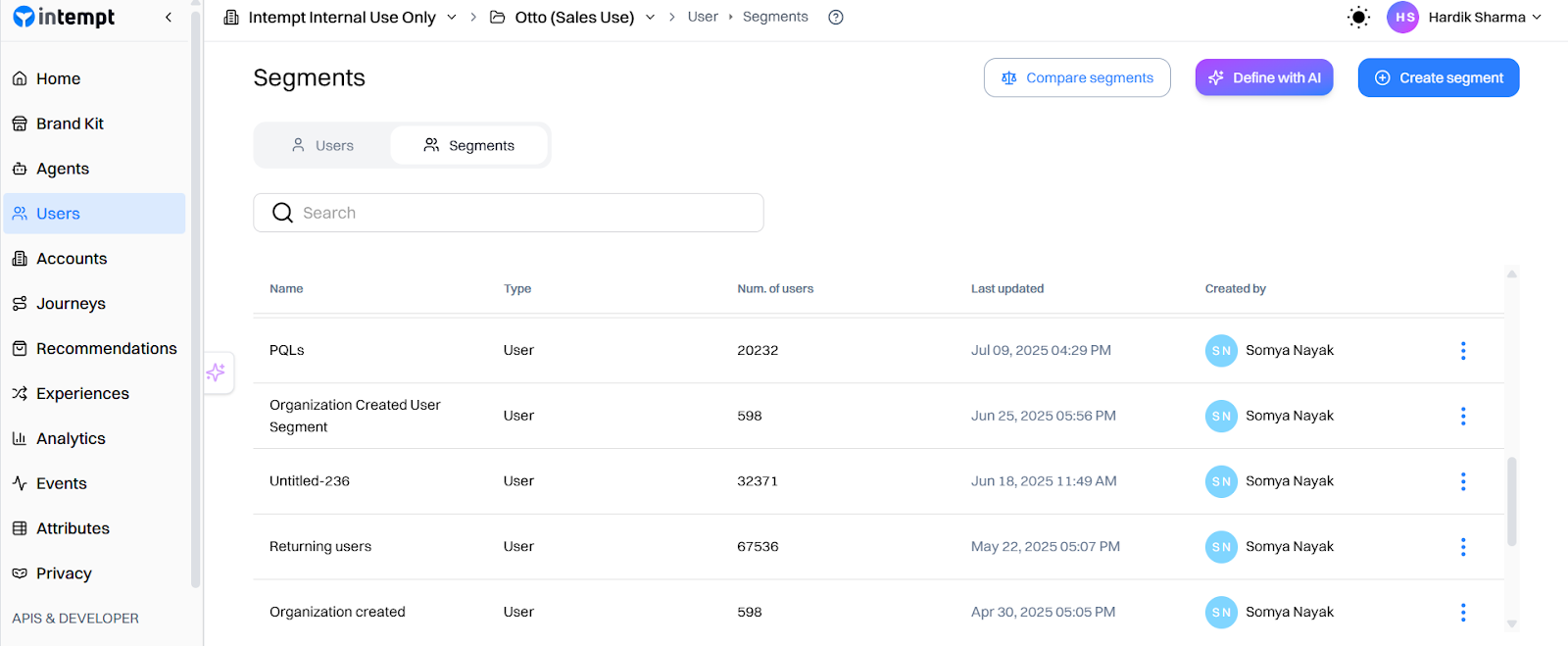
Step 2: Map Out A Guided Journey
Design a sequence that helps new users reach those milestones.
Outline:
- What happens first, next, and after.
- What to trigger if users stall.
- What message to send when they succeed
Think like a game designer: create checkpoints, rewards, and smart detours.
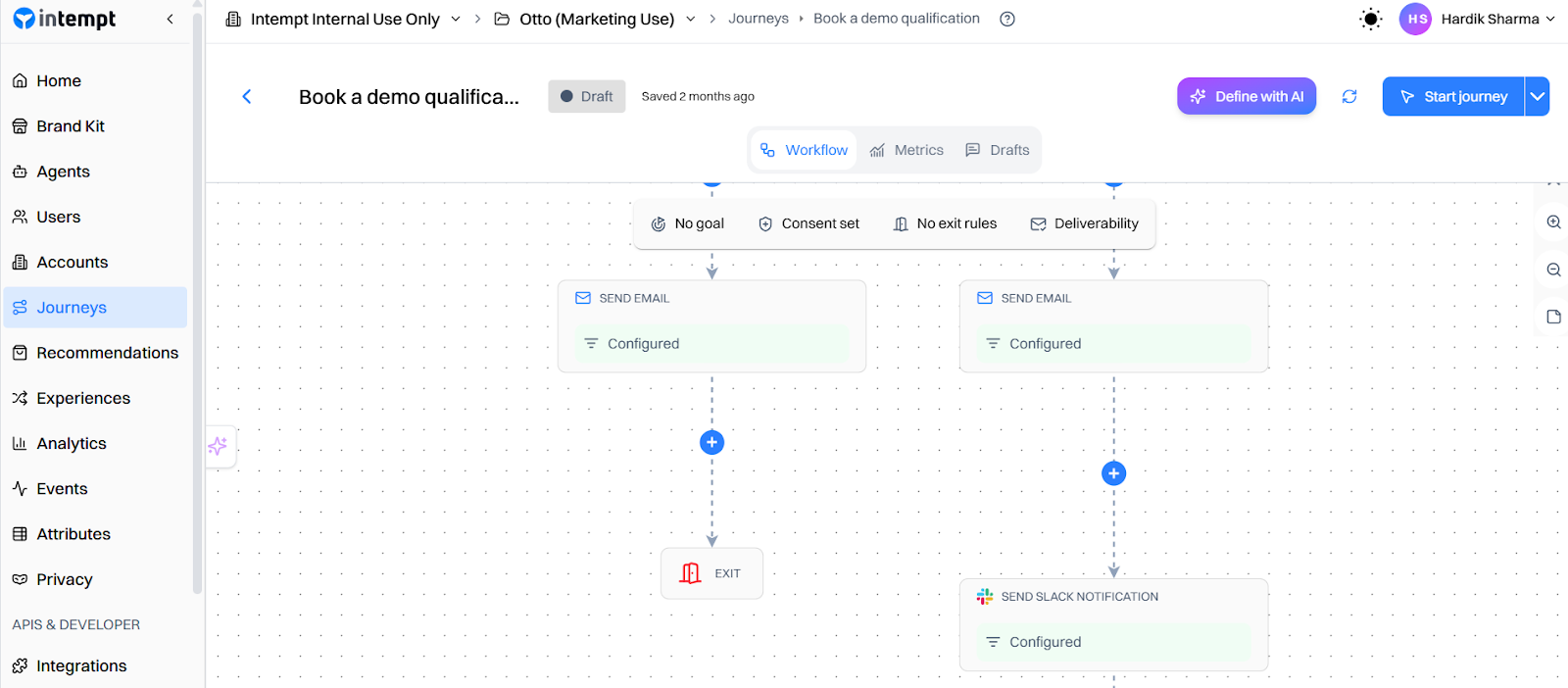
Step 3: Use Triggered Messages (not just time-based drips)
Replace generic “Day 3 of your trial” emails with event-driven automation.
Examples:
- User signs up → Send a welcome message.
- The user doesn’t complete Action 1 within 24h → Send reminder.
- The user completes Action 1 → Congratulations and prompts Action 2.
Triggered messages are contextual, relevant, and convert better than one-size-fits-all drips.
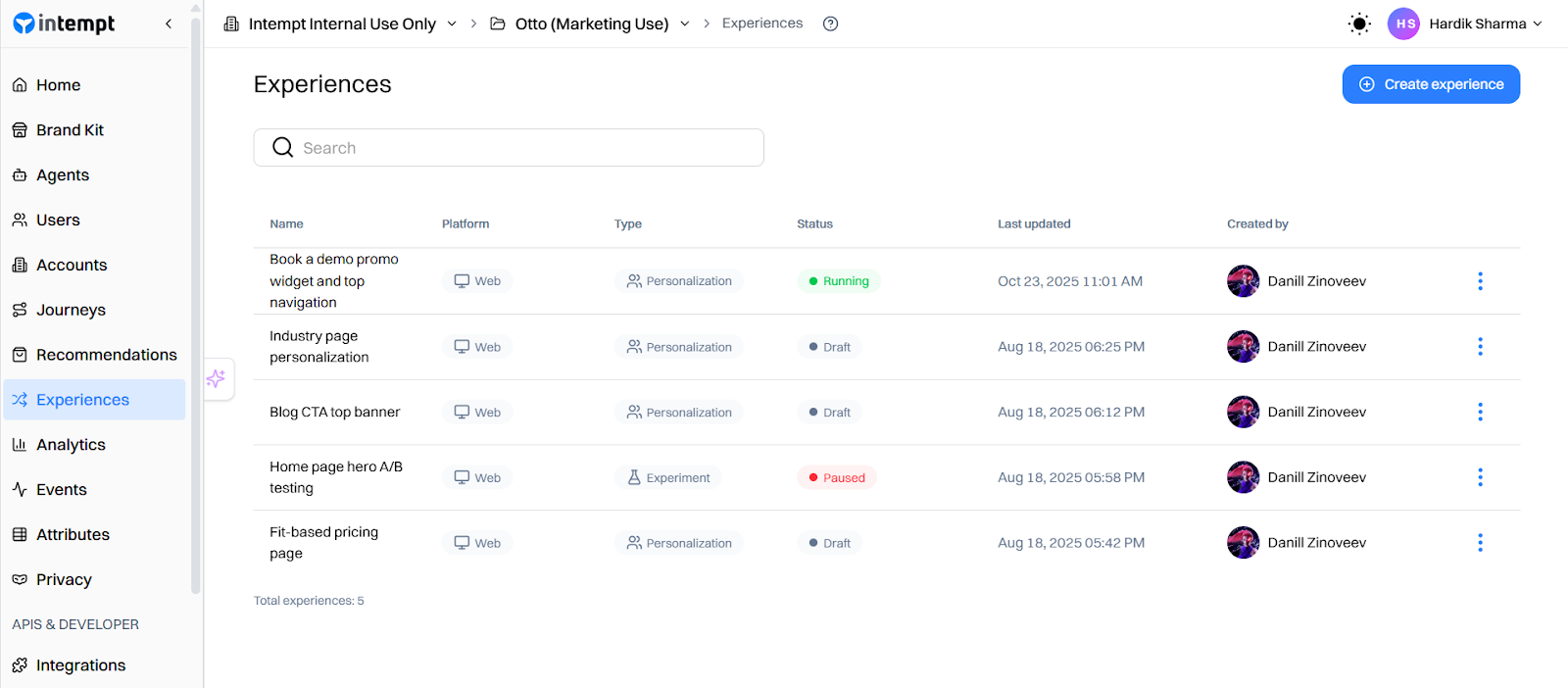
Step 4: Personalize the In-App Experience
Show different interfaces for new vs. returning users. Leverage in-app guides, tooltips, checklists, and tailored content for newcomers:
- Highlight next steps (e.g., “Click here to invite a teammate”).
- Adapt dashboards as users progress.
- Remove completed steps dynamically.
Personalization keeps users focused and prevents them from feeling overwhelmed.
Step 5: Loop in Your Team for High-Value Users
Define what “high-value” means for your business (company size, usage level, or pricing interest).
With in-app features, set alerts to notify your team when:
- A key user signs up.
- A trial account hits a milestone.
- An enterprise lead stalls mid-onboarding.
Your team can instantly reach out, add a personal touch, and reinforce value - without waiting for reports.
Step 6: Measure and Iterate
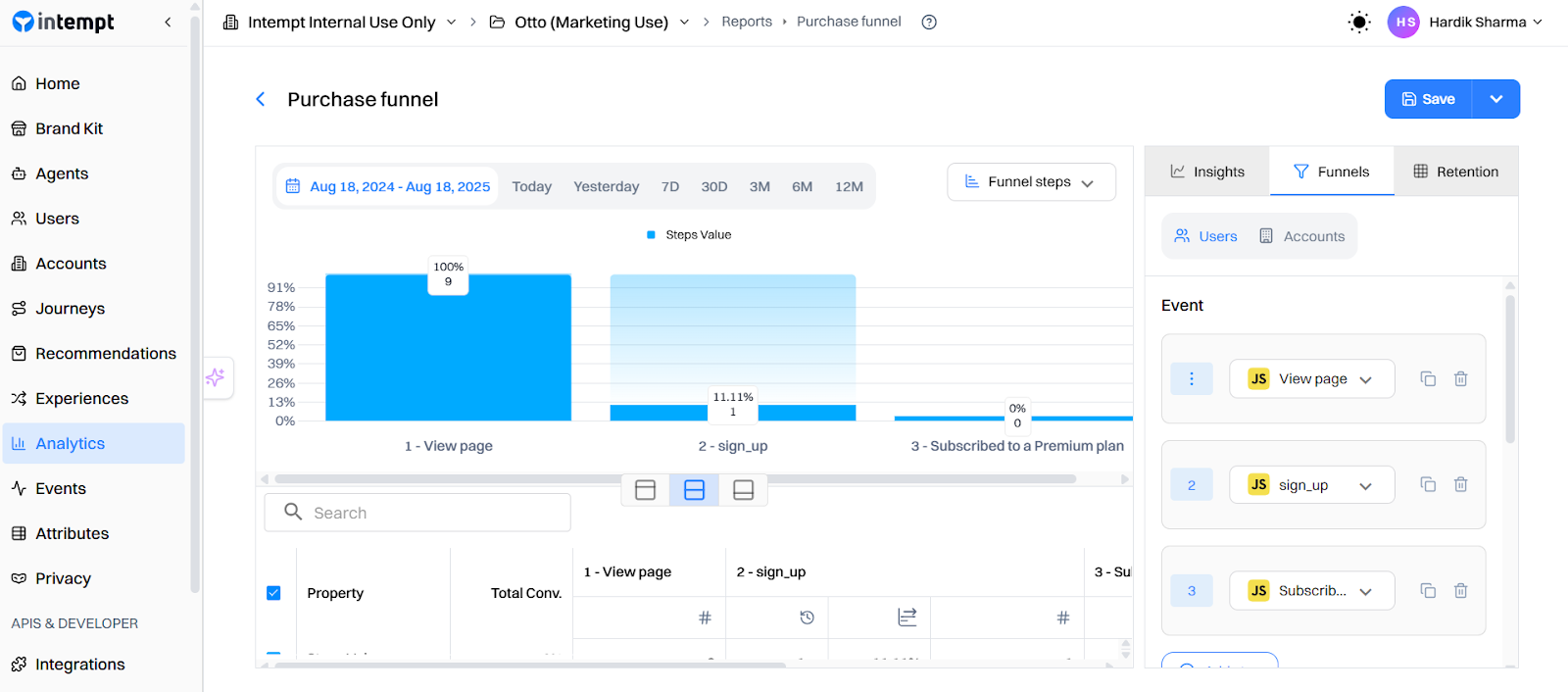
Treat your onboarding like a living experiment. Track different types of metrics and analyze “How” and “What” works for you. Some metrics you should track are:
- Activation rate: % of new users completing key actions.
- Time-to-activation: How quickly users reach “aha.”
- Trial-to-paid conversion: The ultimate proof.
When you see drop-offs (e.g., Step 2 confusion), refine messaging, improve UX, or add support prompts. With Intempt, because your messaging and personalization are all in one place, you can easily adjust timings, content, or add new branches to test improvements.
By following these steps, you’ll create a much more engaging onboarding process. The goal is that no new user falls through the cracks unnoticed. Either the automated journey re-engages them, or your team does. Every user gets every chance to see why your product is awesome.
Frankenstack: The Hidden Killer of Activation
Here’s the reality for most SaaS teams: onboarding struggles often stem from tool chaos, not a lack of strategy.
You’ve got Segment collecting events, Mixpanel or Amplitude crunching analytics, Braze or Customer.io for messaging, VWO for A/B testing, and maybe a Zapier workflow duct-taping alerts into Slack or HubSpot. Individually? These tools are solid. Together? It’s a mess.
We call this the Frankenstack-a stitched-together setup where every piece speaks a different language. Data gets delayed. Teams chase alignment. And worse, your onboarding journey ends up blind to real-time user behavior.
Companies are spending more time aligning tools than aligning teams. And it shows.
- Events don’t sync across platforms.
- Users get emails for features they’ve already tried.
- Sales has no clue which high-value accounts are stuck in the onboarding process.
This is what we call the Data Silo Problem - and it’s a silent killer of activation. The result? Slow experiments. Irrelevant messaging. Missed revenue.
The fix? A unified stack that connects product signals, messaging, and team alerts under one roof - so you’re always in sync with the user’s journey.
The GrowthOS Way: One Platform to Activate Them All
After breaking down the complexity of scattered tools, let’s talk about what’s possible when everything lives under one roof. GrowthOS was built to simplify - not stack more tools on top of your stack.
Instead of gluing together half a dozen platforms and hoping they play nice, GrowthOS gives you everything you need to onboard, activate, and retain users in one tightly connected system. It brings product, marketing, and sales into the same rhythm - so your onboarding strategy isn’t just smarter, it’s faster and more effective.
Here’s what that looks like:
- Unified Data Layer: Every action, segment, and message runs off the same clean event data.
- Real-Time Segmentation: Instantly target users based on behavior (e.g., “signed up but hasn’t invited teammate”).
- Trigger-Based Journeys: Send personalized nudges-email, push, in-app-driven by real user behavior.
- Built-in Experiments: Test different onboarding flows, tooltips, or messages directly within GrowthOS.
- Sales Alerts: Notify reps when a trial user shows intent or gets stuck-so your team can act with perfect timing.
The result: seamless, guided onboarding that turns more users into paying customers.
Two Quick Plays You Can Ship This Week
Play A: Guided Trial Activation
Goal: Help new users complete key setup steps fast.
In GrowthOS:
- Trigger a welcome flow when signing up → prompt “Create first project.”
- If no action within 24h → in-app tooltip + reminder email.
- When the project is created → prompt “Invite a teammate.”
Why it works: Step-by-step nudges drive immediate engagement and shorten time-to-value.
Play B: High-Value User Alerts
Goal: Engage high-intent users with personal outreach.
In GrowthOS:
- Define high-value accounts by company size or domain.
- Trigger Slack/CRM alert when they hit onboarding milestones.
- Sales sends a quick personal email offering help or a demo.
Why it works: Combines automation with a human touch-perfect for converting top-tier prospects.
TL;DR
- Activation drives monetization-focus on getting users to “aha” fast.
- Replace generic drips with triggered, contextual messages.
- Personalize onboarding using behavioral cues and user milestones.
- Eliminate Frankenstack chaos with GrowthOS’s unified data and messaging system.
- Measure activation rate, time-to-value, and trial-to-paid conversions.
- Iterate constantly; the best onboarding journeys evolve with data.
FAQs
1) What does a realistic “activation rate” look like for a SaaS onboarding flow?
It varies by product complexity and segment, but you shouldn’t expect 100 %. For example, one post showed a company moving from ~41% to ~78% activation after improving personalization and reducing friction.
2) What’s the difference between adoption and activation?
Activation is the first meaningful value-use (user does a key action); adoption is longer-term habitual use of the product. As one Redditor wrote:
3) How should I personalise onboarding for different user types?
One tip: early in onboarding, ask a quick question (or infer) what their goal is, then tailor content accordingly.
“Instead of one-size-fits-all tours, try micro-segmenting users based on their sign-up data or first few clicks.”
4) What are common friction points in onboarding that cause drop-off?
Some common friction points are:
- Over-complex UI or too much information at once.
- Unclear value proposition (user doesn’t understand what to do next).
- Too many steps before the “aha” moment.
5) How do I measure the success of activation & onboarding beyond “did they click this”?
You should focus on activation rate, time-to-value, early retention and conversion.
FAQs
Can I trial Webflow before paying?

Sure! You can test out Webflow on our free plan where you can experiment with 2 projects. Your unhosted projects will have a two-page limit, but you can purchase a site plan on a per-project basis to unlock up to 100 static pages and additional CMS pages.
What is a project?
A project is a website that you build in Webflow. You can publish projects to a webflow.io staging subdomain for free, export the code on a paid plan, or add a site plan to connect your custom domain and unlock hosting features.
What can I white label?
Pro accounts can add their own logo to Client Billing forms and the Editor. Pro accounts can also remove references to Webflow in the source code and form submission emails, and hide the Webflow badge from their staging sites.
How much traffic can the hosting handle?
Webflow hosting scales automatically to handle millions of concurrent visits. All site plans serve sites through our Amazon's Cloudfront CDN and accelerated using Fastly, loading sites in milliseconds.
What kind of support does Webflow provide?
We offer fast email support to paid accounts and prioritized help for team accounts. Community support (forum.webflow.com) is available to free accounts.
How long does it take to learn Webflow?
If you're new to building websites, our video tutorials will get up and running quickly. If you already know concepts behind CSS and the box model, you will feel at home in Webflow.
Check out Growth Play Library ➡️
Get started free on GrowthOS ➡️
Book a growth call ➡️
.svg)
Sid Chaudhary
Founder & CEO


Looking for ways to grow faster?
Discover marketing workspace where you turn audiences into revenue.
Learn about IntemptReceive Monthly Insights
Get expert insights & news on the latest promotion trends in our monthly newsletter.
Sid Chaudhary
CEO & Founder

Lifecycle automation tips
Industry tips
Case Studies
You might also like...
%20In-Depth%20Comparison.png)
Intempt v/s Klaviyo (2025): In-Depth Comparison
Marketers want seamless customer journeys, not a maze of rules and manual triggers. If the system feels like work, it’s not automation, it’s stress in a shiny UI. Klaviyo has long been the go-to for e-commerce platforms, powering email, SMS, and now even WhatsApp automation. But 2025 teams want more than AI that writes better subject lines; they want an AI comarketer that thinks ahead. In this comparison, we’ll explore Intempt v/s Klaviyo with a sharp focus on their Journeys to help you find out which one delivers true AI-powered orchestration rather than just automated messaging.

%20In-Depth%20Comparison.png)
Intempt vs VWO (2025): In-Depth Comparison
Marketers don’t just want to test ideas; they want to turn those ideas into real customer experiences. Simple A/B tests and standard conversion lifts were once the gold standard, but now they have become the ghost of the past, because in 2025, growth teams demand more. They want to personalize in real time, orchestrate intelligently, and connect experiment results to revenue outcomes.
%20In-Depth%20Comparison.png)
Intempt vs Mixpanel (2025): In-Depth Comparison
Marketers and product teams thrive on data, and let’s be honest, they hate it when it’s scattered across 2-3 different tools, buried in dashboards, and takes a ton of their time just to get a half-answer. Mixpanel has long been the gold standard for analytics, but 2025 teams want more than charts and funnels; they want action. They want orchestration, personalization, and a clear line from insight to revenue. In this comparison, we’re putting Intempt vs. Mixpanel under the microscope, feature by feature, insight by insight, to help you find the smarter and more future-ready analytics partner for your team.
Subscribe to The Full Stack Marketer 📈
Zero theory or mindset discussions here; just actionable marketing tactics that will grow revenue today.

Web A/B testing
Use front-end A/B and multi-page experimentation product built for any business size. Run multiple experiments on the same page.

Targeting & personalization
Deliver targeted messaging, personalized offers and recommend the most relevant content for your users.

Visual editor
Empower your team to collaborate with an easy-to-use visual editor without using developer time to get things up and running.

Analytics
Gain insight into the impact of your experiments with statistically valid results. No complex statistical analysis required.

Server & client-side testing
Go beyond client-side testing and deploy experiments on the server-side. Test and optimize content changes and even complete re-brands.

Flexible goal selection
Select the right goal for each personalization and experimentation campaign to ensure you’re optimizing towards the right objectives.
.svg)

.svg)


.svg)
.svg)