
If you're spending hours researching leads, manually writing follow-ups, and still not getting replies, you're not alone. Most sales professionals stay stuck in the same cycle, and they usually don't lack effort. It's the process.
In this guide, I'll show you how to use AI for sales prospecting. You'll find the right outbound prospects. You'll send personalized follow-ups through journey orchestration. You can do it all without switching between a dozen different tools.
What Is AI Sales Prospecting?
The sales prospecting process is the foundation of every pipeline, and it's one of the most time-consuming parts of the job. AI for sales changes that. It uses artificial intelligence to find, qualify, and reach potential buyers without doing it all manually.
In the past, prospecting meant:
- Cold calls and hours of manual research
- Copying data between tools
- Writing the same email again and again with small tweaks
Now, AI can:
- Analyze lead data and score prospects by comparing them with your ideal customer profile
- Write personalized emails for each lead
- Trigger automatic follow-ups based on real behavior and data
The result: your sales team spends less time on admin work and more time talking to people who are ready to buy.
Why Use AI for Sales Prospecting?
Better lead quality. AI scores lead using your criteria. This keeps you focused on leads most likely to convert, not whoever tops a spreadsheet.
Less time wasted. Research, scoring, and follow-up writing are all automated. What used to take hours takes minutes.
Personalization at scale. Instead of sending the same personalization email to 500 people, AI personalizes each message using the lead's profile and behavior. It sounds like you wrote it yourself.
Faster follow-ups. AI can trigger outreach the moment a lead matches your criteria. No more leads going cold because nobody followed up in time. A shorter sales cycle starts with a faster first contact.
Everything in one place. Instead of managing five different tools, you can run the entire workflow from a single platform. Sales management becomes a lot simpler when your data, scoring, and outreach all live in one place.
What You'll Need
Overview of the Workflow
- Create a targeted lead list using Apollo or Clay
- Import that list into Intempt
- Set up an AI research agent to score your leads against your ICP
- Create personalized emails using AI
- Set up automated journeys that trigger based on prospect score
Step 1: Create Your Lead List
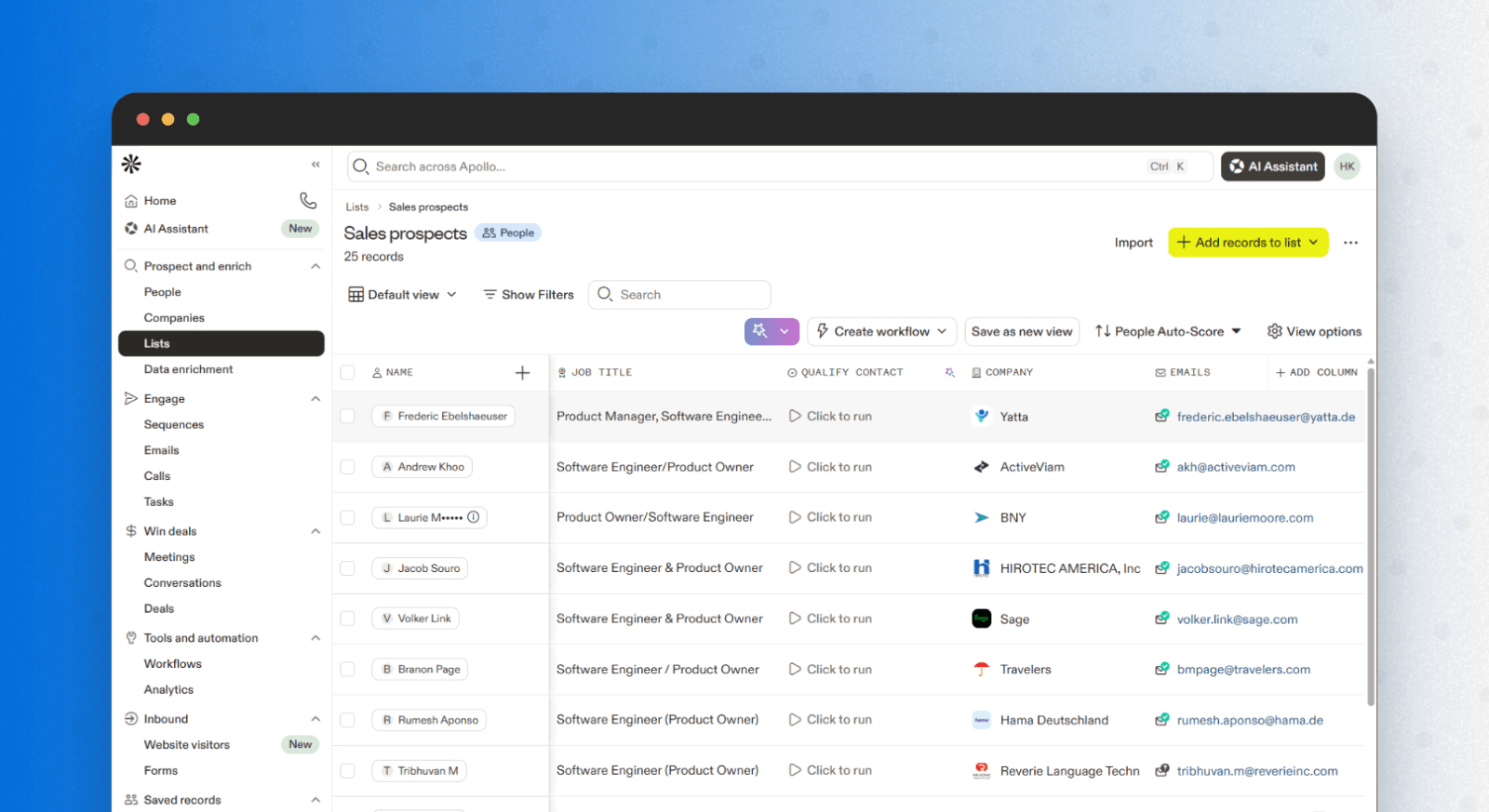
Think about the type of person who gets the most value from your product or service, then build around that. Here's what to do:
- Identify your key ICP attributes: job title, company size, industry, and location
- Open Apollo or Clay and filter leads based on those criteria
- Export the list as a CSV file
One rule to follow: target quality over quantity. A list of 200 well-targeted leads who are a good fit will always outperform a list of 2,000 random ones.
Step 2: Import Your Lead List into Intempt
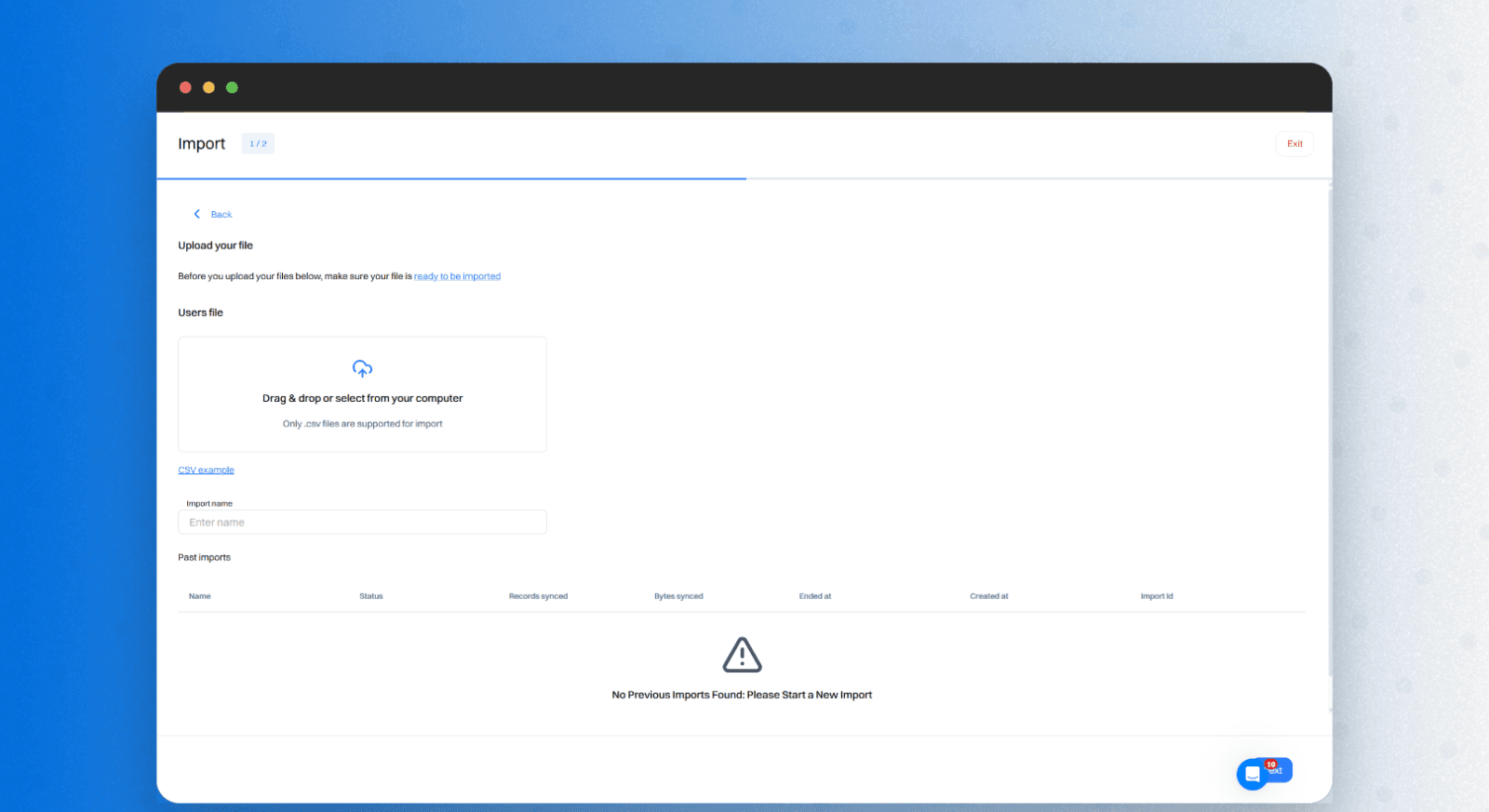
Once your CSV is ready, here's how to import csv into Intempt
- Go to the Users section and select the import option
- Upload your CSV, and Intempt will auto-map fields like job title, company, and location
- Review the mapped attributes and adjust if needed
- Create segments from this view if you want to group leads before moving on
Important: if you want this workflow to trigger in real time as new leads come in, use the API integration instead of a manual CSV upload. That way, the system picks up every new matching lead automatically, no manual action needed.
Step 3: Set Up the Research Agent
This is where the AI really starts doing the work for you.
- Go to Agents inside Intempt and create a new Research Agent
- Write a prompt that describes your ideal customer, for example:
"Analyze new leads and assign each a prospect score based on how well they match this ICP: B2B SaaS company, 50–500 employees, growth or marketing team, based in North America or Europe."
- Add as many criteria as you need: company type, team size, geography, and common problems your ICP faces
- The more context you give the agent, the more accurate its scoring will be
Once deployed, the research agent:
- Reads the data on each incoming lead
- Evaluates the full picture, not just whether a box is ticked
- Writes a prospect score attribute directly to the lead's profile
- Scores the way a good sales rep would when reviewing a list
Your journeys will use this score to decide who to contact, when, and with what message.
Step 4: Create Personalized Emails
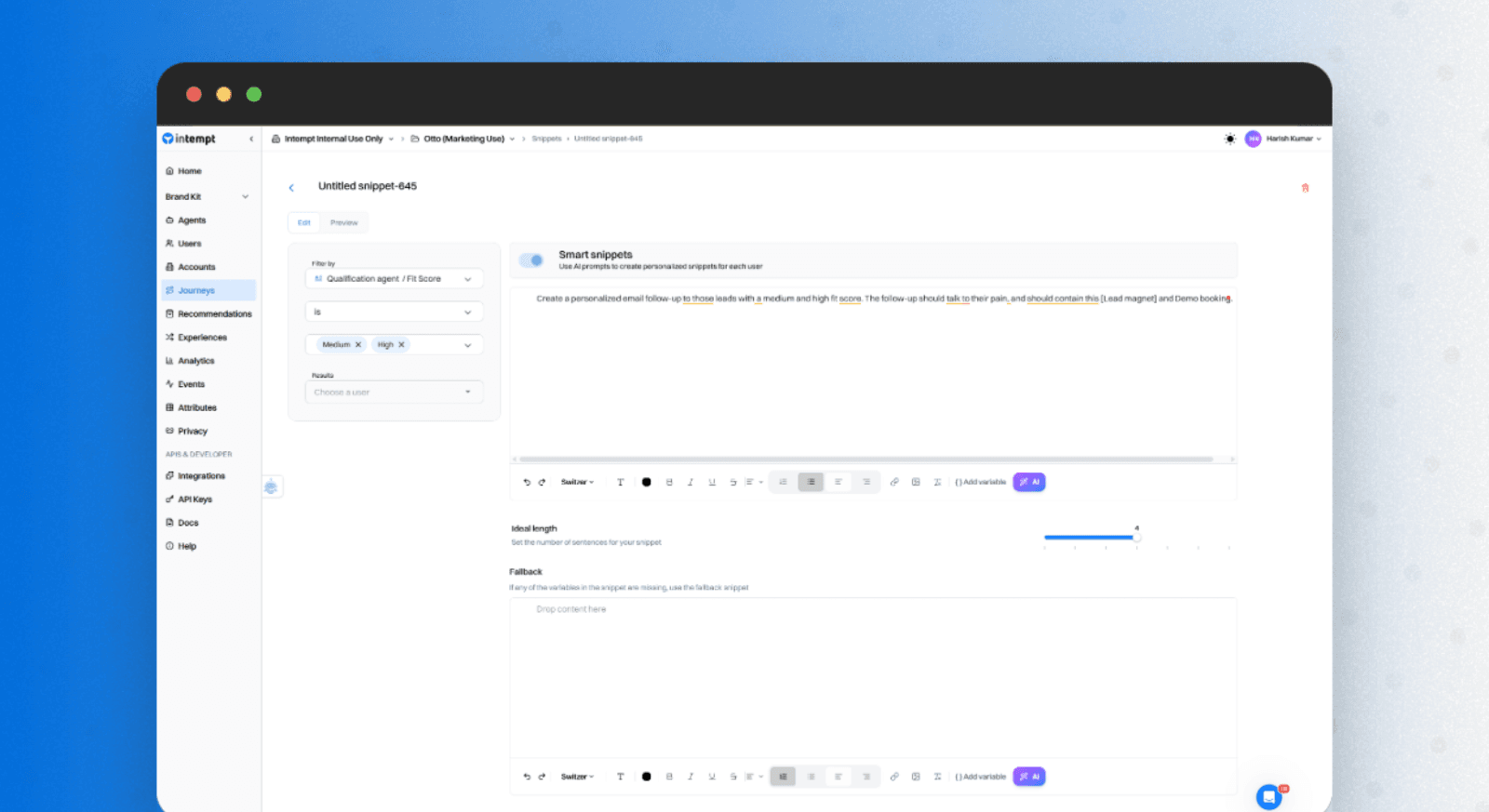
You won't be writing these from scratch. Here's the process:
- Go to Journeys > Snippets inside Intempt
- Write a prompt asking the AI to generate an email for Medium and High prospect score leads
- The AI uses each lead's job title, company, behavior, and other attributes to write personalized messaging, not a generic template
- Create a second snippet for Low prospect score leads to personalize outreach with a softer tone, a different value angle, or a different entry point into the problem
- Go to Messages, create a new email, and recall the snippet in the text section
- The AI pulls in the right version for each lead automatically
Always preview the email with real lead data before moving on; personalization tokens can break, and formatting can look off.
Step 5: Set Up Automated Journeys
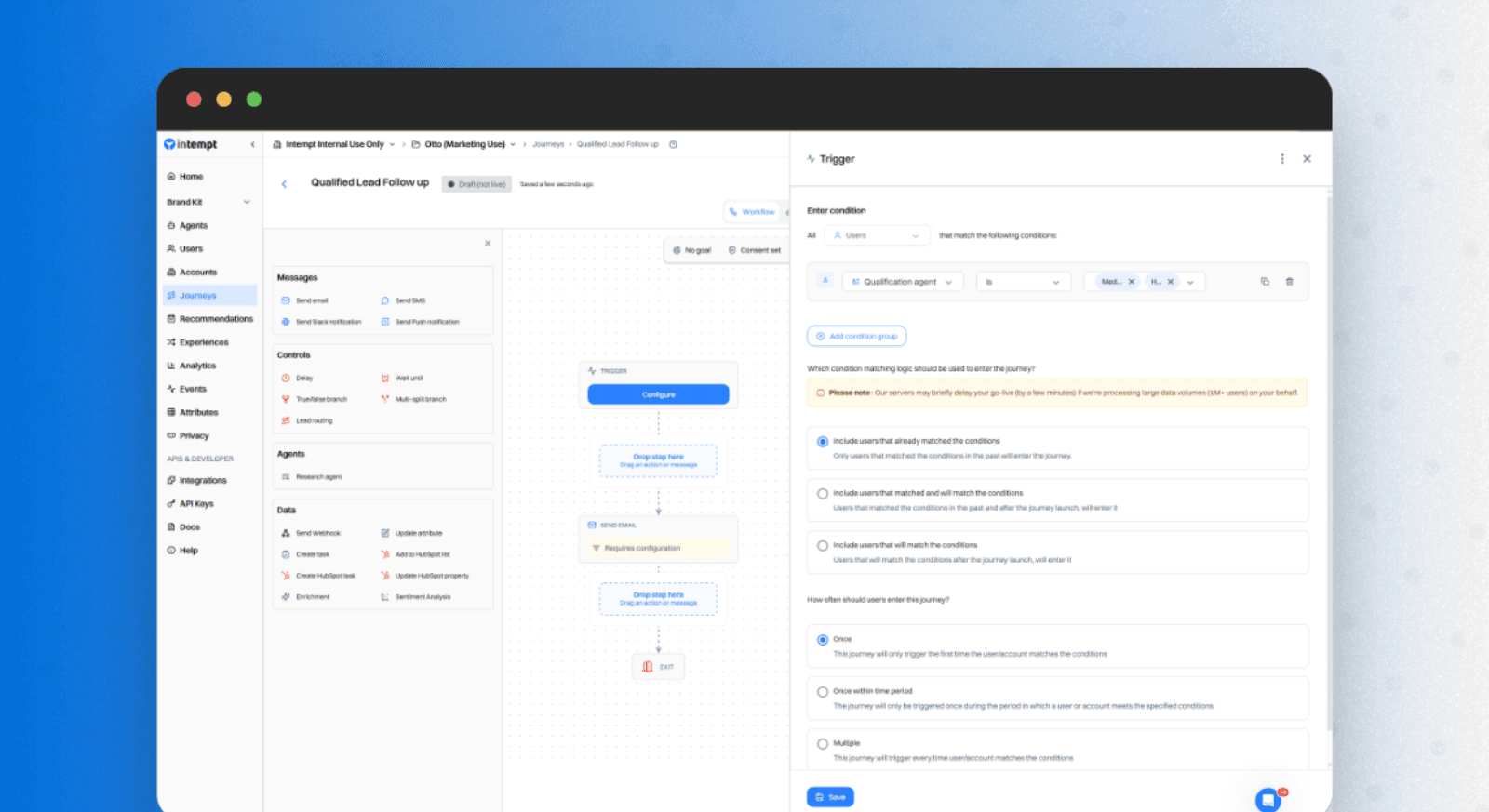
This is what ties everything together. Here's how to build it:
Main branch (High and Medium score leads):
- Go to Journeys and create a new journey
- Set the trigger: Prospect Score is High or Medium
- Add an email block and select the email you created in Step 4
- Configure the send settings. The main branch is done
Second branch (Low score leads):
- Add a new branch to the same journey
- Set the trigger: Prospect Score is Low
- Add a different email block with your low-fit snippet, a softer message, a different value angle, or a piece of content that builds awareness before asking for anything
That's the whole workflow. Whenever a new lead enters your sales outreach pipeline:
- The research agent scores them automatically
- High and Medium scores get a personalized email built for someone close to your ICP
- Low scores get a lighter message that keeps the door open
- Nothing requires manual input
Common Mistakes to Avoid
Importing dirty data. Missing fields, wrong job titles, and outdated info will cause the research agent to score based on bad inputs. Before importing:
- Remove duplicates
- Fill in missing fields where possible
- Make sure key attributes are consistent
Writing a vague ICP prompt. "Find good leads" will get you inconsistent scoring. Be specific about company type, team size, role, geography, and the problems your ICP is likely dealing with.
Sending the same email to all tiers. A High score and a Low score lead should never get the same message. Adjust the tone, value proposition, and call to action for each tier.
Ignoring the Low score branch. A Low score today doesn't mean a bad lead forever. A lighter-touch message costs you nothing and keeps them warm.
Skipping the email preview. Always preview with real lead data before activating. Personalization tokens can break, snippets can pull the wrong content, and formatting can look off.
Ways to Take This Further
Add a multi-step follow-up sequence.
- After the first send, add a wait block of 3–5 days
- Follow up with a new angle, a case study, a specific result, or a direct question
- A three-step sequence consistently outperforms a single send
Layer in website behavior to sharpen scoring.
- Connect Intempt to your website
- Feed behavioral signals into the research agent's context, pricing page visits, demo views, and repeat sessions
- Real-time behavior makes prospect scores significantly more accurate
Trigger a sales rep notification on high-score leads.
- Add a step that fires a Slack alert or internal email to sales when a lead scores High
- The highest-intent leads deserve a personal touch. Don't let them fall into an automated sequence alone
Set up a re-engagement journey for leads that go cold.
- Leads that go quiet are a silent drain on your sales pipeline
- Trigger a journey when a lead was once Medium or High but hasn't opened an email or visited your site in 30 days
- Send something new, a product update, a relevant piece of content, or a fresh angle
Add SMS, push, or social media platforms to your journeys.
- Some audiences respond better to SMS or browser push than email
- You can also coordinate outreach across social media platforms like LinkedIn in the same journey
- Adding a second channel to a high-score sequence typically increases response rates
Build a nurture track for low-score leads.
- Create a separate journey that runs over 4–6 weeks
- Send useful content and relevant use cases, no hard sell
- As leads engage, their behavior re-scores them, and they move into the main sequence automatically
Use segmentation to sharpen your research agent over time.
- Use Intempt's segmentation to see which prospect score tiers are actually converting
- If Medium and High are converting at the same rate, your ICP prompt may be too broad
- If Low scores never convert, tighten your criteria
- The data feeds directly back into making the agent smarter
What You've Built
- It scores every lead automatically against your ICP using AI reasoning, not rule-matching
- It sends personalized emails that sound like you, not a generic template
- It routes each lead into the right journey based on ICP fit
- It follows up instantly, without manual triggers
- It keeps everything in one place, so you're not losing context when switching between tools
You're not just automating follow-ups. You're automating smart follow-ups that respond to who each lead actually is.
Frequently asked questions. Answered.
No. The research agent uses a plain-text prompt. Snippets use natural language. The journey builder is drag and drop. If you can use a spreadsheet, you can set this up.
Up to 30 minutes to score all existing leads after deployment. New leads are scored as they come in.
Yes. Any tool that exports a lead list as a CSV will work. The import step in Intempt is format-agnostic as long as your columns are clearly labeled.
No. AI handles the repetitive parts of prospecting, so your team can focus on the sales calls and conversations that actually require a human. Qualifying 500 leads, writing individual emails, and following up at the right time are all things AI can do better and faster. But building relationships and closing deals still requires a person.
Check your research agent prompt first. Low response rates from High score leads usually mean the emails are too generic or the ICP is too broad. Tighten the prompt, adjust your criteria, and test a different snippet for that tier.

About the author
Harish Kumar
Growth Marketer
Harish writes long-form content on SaaS growth, user onboarding, and marketing automation. He specializes in helping product and lifecycle teams improve activation rates and reduce early churn.
LinkedIn